- Installed the homebrew launcher on my New 3DS XL: https://3ds.hacks.guide/
I also use an Acekard 2i to play DS/NDS games. It uses a microSD card. I forgot there is also one inside the 3ds for a shamefully long time while following the guide... - Also installed the homebrew launcher on my Wii U: https://wiiu.hacks.guide/
I purchased New Super Mario Bros from Nintendo eShop- not realizing it becomes the shell for Haxchi.
- DNS info for blocking Nintendo updates: https://github.com/FlimFlam69/WiiUTutorial/wiki/1:-Blocking-Updates-From-Nintendo:
- Modified two Sonoff Basics to add to Smartthings: https://www.youtube.com/watch?v=FxV_zWvxbSE
Flashing and Wireless setup went Ok. I added the Device Handler and SmartApp to my Smartthings IDE. Smartthings is having troubles discovering- even with direct IP information. - I am still considering Home Assistant; I have it installed on a RPI 3B with an Aoetic Z-Stick Gen 5- just need to take the time to learn more and configure: https://www.home-assistant.io/docs/
- Started wiring some old RGB LED strips I found as under-cabinet wiring. While looking on Amazon, I can order a roll of WS2812b addressable RGB LED strip and an in-line controller for less than a decent 3 channel RGB controller
1.10.2019
This week I...


3.04.2018
[ Learning Amateur Radio ]
Basic Radio Info:
P25 (Program 25) Digital Radio:
Good video on radio types and uses:
Useful Links:
11.14.2017
Pi-Hole Ad Blocker
I learned about Pi-Hole on a recent episode of the New Screen Savers. Pi-Hole converts a Raspberry Pi (model 2/3) into a DNS server with a large database of advertising sites. If a DNS querry is looking for one of the sites, Pi-Hole blacholes the request so ads are not served. DNS servers can be configured via DHCP. I set the Pi-Hole as my primary DNS and moved the OpenDNS servers down in my pFSense DHCP settings; this will let my computers failover to OpenDNS is the Pi-Hole is offline.
From a console on a Raspberry Pi (RPi) running the lastest Raspberian, run:
curl -sSL https://install.pi-hole.net | bash
The instlal will go through a wizard for settings and provide a passowrd when finished. This password is needed to acces the Pi-Hole admin screen:

Changing the password was not an option from the admin settings: for a password change, SSH into the RPi and enter:
pihole -a -p somepasswordhere
I disabled uBlock Origin on my browser and I cannot tell the differnece; the Pi-Hole appears to be at least as good as the extension. it also will provide adblock for devices that cannot use uBlock- such as my phone or my Android tablet.
10.01.2017
A Tale of Three PSPs

- 1st PSP (TA-082): Had obvious signs of water (more likely it was diet Coke/Pepsi) damage; there was corrosion on parts of the internal metal frame, the power and WiFi switches were sticky, the paper backing on the screen was deteriorated/torn/stuck, and there was a line of dark ‘goo’ encircling it beneath its silver edging. The unit would not power on as a short had burned through three conductors in the ribbon cable (and the on-board connector) that connected the power board to the mainboard. (Also, a nice burn mark on the metal frame over that area). Later I would find the screen had many diagonal streaks that appeared to be from a dark stain on the LCD or backlight panel.
- 2nd PSP (TA-079): this was sold with a defective screen. Powering also appeared to have issues, but it ended up being a problem with the battery not seating correctly. I replaced the screen with one from the earlier PSP and it worked- but the screen has strange streaks across that looked bad.
After replacing this, everything worked Ok and I could install a 6.6PRO-C2 custom firmware. (more on this later). - 3rd PSP (TA-086): this unit was sold as-is untested. The exterior was in much better shape but it initially would not power on. I booted to a Pandora’s battery with some success, but ran into a problem as it would also try to access the UMD drive when powered on (with no UMD inserted), hang for 30 seconds and display a message that it was unable to read the disc. After the delay, the PSP seemed to work, but I had power issues (I suspect my battery again). I did find a spot of corrosion on the UMD ribbon cable that had eaten entirely through one of the traces (I had to use a jeweler’s loupe to see the break).


The screen from this device was removed and installed in the 2nd PSP to make it 100% functional. I transplanted the 2nd PSP’s screen (the ugly one originally from the 1st PSP) into this. I also tried swapping the UMD assembly with the drive from the first PSP with the same pause on startup result. However, after I manually manipulated the sensor and eject lever in the UMD drive, it started working normally (save for the ugly screen).
I now have:
· One fully working PSP 1001
· One working PSP1001 with a bad display and a suspect UMD drive
· One dead psp: Dead board, bad power ribbon cable, bad umd ribbon drive, broken UMD door, broken screen…
I ordered a white full housing replacement for the working PSP from eBay. I am still deciding if I want to purchase an additional PSP (for parts), order a replacement LCD screen, or recycle the partially working unit.
PSP Mods:
My old Pandora’s battery and Magic Memory Stick (MMS) was old and it flashed v3.71 onto the PSP 1001s. They behaved oddly and I assume this was due to changes made with later firmware. I found Rain’s MMS Maker v1.2 to make a newer (v5.00) MMS and this flash seemed to behave better. (Note: hold down left trigger when booting with new MMS and inserting Pandora’s Battery; the older 3.71 MMS boots without this.) I had trouble figuring out how to update to a newer version, and realized the Pandora’s Battery is now obsolete.
Installing the 6.60PRO-C2 CFW is much easier:
1. Update to the official 6.60 firmware
2. Copy the 6.60PRO-C2 CFW to the Memory Stuck
3. Run the Update from the Games menu in XMB
4. Run the CIPL Flasher (only for PSP1000s and early PSP2000s)
This CFW will work on any PSP, but later model PSP 2000s and PSP3000s (and PSP Go) will need to re-run the Update on each hard reboot.
Memory Stick Replacement:
![clip_image001[4]](https://blogger.googleusercontent.com/img/b/R29vZ2xl/AVvXsEj5BqVRLoyvs493eDblVNRDhbqVWxylqWS4Ae3Dgg_hCRN6SB7eqfEHJtpp96vHS7MUVy538cbLGiCg-PULRLIdcNGeI_yv1HNk3T1soqHiZjeXrJlJ51icw9qW_REH0iwrRZLnww/?imgmax=800 "clip_image001[4]")
I eventually destroyed the adapter (crushed, broken and burned) and ordered a single Micro SD adapter from amazon. The new card will not work with my 128GB Micro SD but does work great with a 64GB card. 64GB can hold a lot of PSP CSOs (compressed ISOs). :)
9.30.2017
Old Playstation Tomfoolery
In a prior post, I mentioned finding my old PSP Go and regaining interest in the old Patpon game. I have a dock for my PSP Go! and discovered there an option for sending the video out to my TV via an componet cable. I also learned I could use a PS3 controller with the PSP Go while for control- put it requires a PS3 to pair it. Luckily I have an old (phat) PS3 in the closet..
 My PS3 was second gen (CECHE01) and was running firmware 3.51. A google search revealed the PS3 is ‘hackable’ up to v3.55; after that, I would need a hardware device to downgrade to v3.55.
I could find no explict instructions on how to upgrade an old 3.51 firmware to a modified 4.81. The process I eventually used:
- Upgrade PS3 to official frimware (ofw) 3.55
- Extract PS3UPDAT.PUP from the zip and copy to \PS3\UPDATE\ on a USB drive
- Insert the USB drive into the PC and perform an update from local storage
- Copy over and run the Kmeaw 3.55 Jailbreak
- Same process as installing the 3.55 OFW
- Update to 4.5.3 Rebug CEX custom firmware (CFW)
- CEX = consumer/simple version, DEX = developer version
- Upgrade to 4.81.1 Rebug REX CFW
- REX = simple version, D-REX = developer version
- Install supporting apps (copy to root of USB drive and use the Package Manager included with Rebug to install)
- Rebug Tool
- MultiMAN
- Update to 4.81.2 Rebug REX CFW
The last two updates probably could have been combined, but I was unaware of the 4.81.2 release until I began this post.
I also repalced the hard drive in my PS3 with a 1TB drive.
MultiMan is a file manager tool that allows me to copy my PS3 games to copy and paly my games from the internal hard drive. It also allows me to run PS2 and PSX games- but this may actually be handled by the Rebug firmware and MultiMan only provides and interface to launch. I was able to play the orginal PSX Crash Bandicoot from my origial disk with no issues. (This game also made me realize I do not like this genre of video games as much as I once did.)
During the upgrade proces, I kept my PS3 offline to ensure I would not recive a PSN ban for running a modified console. Rebug 4.81.2 indicates it should work with PSN ‘until the next firmware update’ (Sony’s last official update was Nov 1st, 2016), so I will give it a go; worst case scenario is I will only be able to play local games offline- which is my preffered gaming type.
So far, I have been able to update the PS store app and download an update for Super Startdust Delta (v5.0 to v6.0) with no problem.
Additionally, there is a large amount of PS3 homebrew applications for console emulators, FTP, IRC, media players…There is even a cloud sync for game save backups.
Final result: I have an PS3 console that can hold all of my PS3 games, play older PSX/PS2 games, run emulators and homebrew.
9.27.2017
LG = Life’s (not so) Good
LG is a company that I want to like; they are not as big as Samsung or Sony, and their products have been fairly inovative. However, I funally ralized their products are unreliable and their customer support is less helful than Comcast support (my former worst support).
I am on my thrid- and last- LG cell phone.
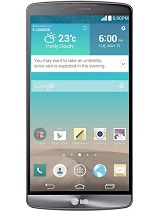 The LG G3 moved the volume buttons to the back of the phone- and that was amusing for a while. The phone itself was slow and chewed through batteries. I used this phone for ~6 months and ‘upgraded’ to the LG V10.
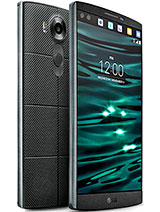 The LG V10 had a second screen for noticicaitons and an enahcned DAC for better sound. It was also ‘ruggitized’ for duriability. It had the rear volume controls around the power button and a fingerprint sensor in the button. The first issue I had with this device is the fingerprint sensor would not work if the phone is in a case…
The GPS was unreliabe; several times I could not get a GPS lock while driving down the interstate in GA. A reboot usually temporarily fixed this- but this also lead into its second issue: the battery would drain much faster than anything could charge. On several occasions, I would try to use Google Maps for directions and the phone would steadly creep down the battery percentage while connected to a QC 2.0 charger. I happily returned this phone when my ‘lease’ ended with T-Mobile.
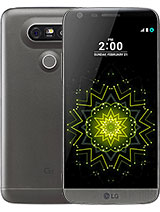 More recently I purchased the LG G5. I loved the phone for the size, the performance and the USB C charging connector. I picked up the LG G5 Camera addon and the LG 360 camera (more info my prior posts) accessory. It seemed to be the perfect phone- until the volume control became intermittiant. I am unsure if it is a hardware or software issue, but it usually stops working after I connect to a bluetooth audi device (headphones, car, etc). A few reboots sometime fixes this, but is yet another LG pain-in-th-ass.
I have LG several chances to make me like them and have received poorly designed (and seemingly untested) devices complimented with poor support and broken support websites; my next phone will be a Google Pixil or a Samsung.
Subscribe to:
Posts (Atom)